Disclosure: This post contains affiliate links. If you buy through them, SuspenseAI may earn a commission at no extra cost to you. Prices were checked on 21 October 2026 and exclude 18% GST.
The legit way to get a free domain in India is to buy a yearly (or longer) web hosting plan that bundles one. Hostinger’s homepage says it plainly: “Free domain for 1 year included with yearly plans.” You pay for hosting, the domain costs nothing in year one, and from year two you renew it at the regular price.
That is the whole trick. No coupon hunting, no sketchy websites, no “100% free forever” promises that fall apart later. In this guide you’ll learn what a domain actually is, why these offers exist, which extension to pick (.in, .com or .co.in), what renewal really costs, and how to claim and connect your domain step by step.
All prices below come from Hostinger India’s pages as of October 2026 and exclude 18% GST, which is added at checkout.
What is a domain name (and what it is not)?
A domain name is your website’s address, like yourbrand.in or yourname.com. Computers find websites using numeric IP addresses. The domain is the human-friendly label that points to that number, so visitors don’t need to remember a string of digits.
A domain is not the same as hosting. Think of the domain as your shop’s address and hosting as the actual shop space where your files, images and database live. You need both to run a website. You can buy them from the same company or from different ones, and you can move either one later.
You also never “own” a domain forever in one go. You register it for a period, usually one year at a time, and keep it alive by renewing. Stop renewing and the name eventually goes back on the market, where anyone can grab it.
The parts of a domain
- Name: the part you choose, such as suspenseai.
- Extension (TLD): the ending, such as
.com,.inor.online. - Subdomain: an optional prefix you create yourself, such as
blog.yourbrand.inorshop.yourbrand.in. Once you own the main domain, you can create subdomains at no extra cost.
Why do “free domain” offers exist?
Almost every free domain in India comes from the same place: hosting companies give away the first year of a domain because it makes their hosting easier to buy. A beginner who wants a website needs two things, and a bundle removes one decision and one bill. The company earns its money on the hosting plan and on domain renewals in later years.
That is a fair deal as long as you understand it. The domain is free for the first year, not forever. Registries still charge for every domain, so someone always pays. In year one the hosting company absorbs that cost; from year two, you do.
Problems start when a website promises a domain that is free with no hosting, no payment and no catch. Those offers usually come with strings attached: limited control, odd extensions, forced ads, or a domain that can be taken back. We’ll cover those in detail further down.
The legit way to get a free domain in India
If you want a free domain in India without risk, the cleanest route is a hosting plan with a bundled first-year domain from a known provider. Here is how the Hostinger version works, based on what its India site lists right now.
How the Hostinger offer works
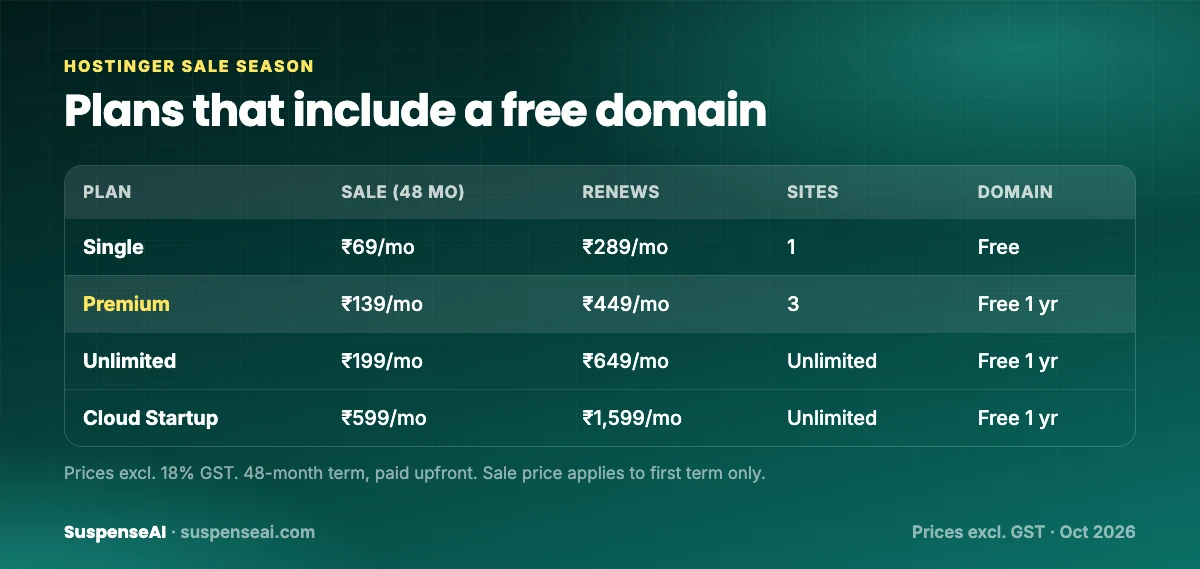
Hostinger India is running its “Sale Season” (up to 83% off, hosting from ₹69/month). Its sale page says Sale Season runs from 19 October to 14 December 2026, so it covers Black Friday and Cyber Monday too. No coupon is needed. The headline prices are for the 48-month term, and you pay the full term upfront.
When you buy a yearly or longer plan, you get a domain free for the first year. You pick the name during checkout or later from the hPanel dashboard. The registration is in your name, so it’s your domain, not the hosting company’s.
Which plans include a free domain
| Plan | Sale price (48 months) | Renews at | Websites | Free domain |
|---|---|---|---|---|
| Single | ₹69/mo (₹3,312 upfront) | ₹289/mo | 1 | Yes, listed |
| Premium | ₹139/mo (₹6,672 upfront) | ₹449/mo | 3 | Free for 1 year |
| Unlimited | ₹199/mo (₹9,552 upfront) | ₹649/mo | Unlimited | Free for 1 year |
| Cloud Startup | ₹599/mo (₹28,752 upfront) | ₹1,599/mo | Unlimited | Free for 1 year |
All prices exclude 18% GST. The Single plan’s feature list says “free domain” without a time limit printed next to it, while the others say “free 1 yr.” To be safe, treat it as a first-year freebie on every plan and confirm the domain line in your cart before you pay.
Every plan also includes free SSL (the padlock in the browser bar), a 30-day money-back guarantee, the hPanel control panel with a Hindi option, UPI payments and GST invoices. If you want a deeper look at which plan suits you, read our Hostinger Sale 2026 India guide.
The ₹1 domain option
Hostinger’s domain search page also lists .in and .com for ₹1 in the first year on eligible terms (the .com deal needs a 3-year term), and .online for ₹99 in the first year. This is useful if you only want a domain right now, or if you want a second domain alongside the free one from your hosting plan. The same rule applies: renewals are at the regular price.
.in vs .com vs .co.in: which extension should you pick?
The extension matters more than most beginners think. It signals who you serve, and it affects what you’ll pay every year after the free one runs out.
| Extension | Best for | Regular price on Hostinger | Watch out for |
|---|---|---|---|
| .in | Indian businesses, local services, Indian audience | ₹899/yr (excl. GST) | Looks local, which is a plus in India but less ideal for global clients |
| .com | Global brands, SaaS, freelancers with foreign clients | ₹1,499/yr (excl. GST) | Short, good names are hard to find |
| .co.in | Indian companies when the .in is taken | Check at checkout | People often type .in or .com by habit and miss you |
| .online | Side projects, testing an idea cheaply | ₹99 first year; check renewal | Less familiar to everyday Indian users |
Our simple rule: if your customers are mostly in India, pick .in. If you sell to clients abroad or plan to grow globally, pick .com. If you can afford it, register both and point one to the other, so nobody else takes your name in the second extension.
Avoid .co.in as a first choice unless your preferred .in is gone. It’s a valid Indian extension, but it adds characters, and people forget the “co” part.
The catch: renewal at the regular price after year one
This is the part most “free domain” articles skip. After the first year, your domain renews at the regular rate. On Hostinger’s domain page, the regular price for .in is listed at ₹899 and .com at ₹1,499, both excluding GST.
Add 18% GST and that becomes roughly ₹1,061 per year for .in and about ₹1,769 per year for .com. That is still cheap for a business address, but you need to budget for it.

Three things to keep in mind:
- You must renew. If you let the domain expire, your website and any email on that domain stop working. After a grace period, the name can be released and registered by someone else.
- Turn on auto-renew, or set a calendar reminder a month before the expiry date. Keep the card or UPI method on file up to date.
- Read the refund terms. Some hosts deduct the cost of the “free” domain if you cancel early. For example, Bluehost India says cancelling early deducts ₹1,260 for the free domain. Before you buy any bundle, check how the domain is handled under the money-back guarantee.
Hosting renewal is a separate bill. On Hostinger, the Premium plan’s sale price applies to the first term only and renews at ₹449/month. The free domain does not change that. We break down full multi-year costs in our website cost for small business in India guide.
Free subdomains and “free domain” sites: the trade-offs
There are two other ways people try to get a website address for zero rupees. One is fine for learning. The other is usually a trap.
Free subdomains (yourname.blogspot.com and similar)
Platforms like Blogger, WordPress.com, Wix and many website builders give you a free address such as yourname.blogspot.com or yourname.wordpress.com. These are subdomains of the platform’s own domain. They’re legit, free and good for practice.
The trade-offs are real, though:
- It isn’t your brand. The platform’s name sits in your address, which looks less professional on a visiting card, an invoice or an Instagram bio.
- You don’t control it. The platform sets the rules. It can change its policies, show its own ads, or suspend your site.
- Moving later is messy. If you grow and switch to your own domain, you’ll need redirects to keep your traffic and search rankings. Some free platforms limit what you can redirect.
- No custom email. You can’t get
hello@yourbrand.inon a free subdomain.
Use a free subdomain to test an idea or learn blogging. Once you’re serious, move to your own domain early, when you have little to lose.
Shady “free domain” websites
Search for “free domain” and you’ll find sites promising a totally free domain with no hosting purchase. Some free-domain services of the past let people register unusual extensions at no cost and then took names back or shut down registrations, leaving websites stranded. Be careful with any offer like this.
Red flags to watch for:
- The domain is registered in the provider’s name, not yours.
- You can’t see or change the DNS settings.
- There’s no clear renewal price, or renewal is “only available inside our package.”
- No transfer option, or a large fee to get your domain out.
- Pressure tactics like countdown timers on a “free” item, or asking for card details for something that’s supposedly free.
- Unusual extensions that spam filters and some users already distrust.
If an offer fails two or more of these checks, walk away. Your domain is the base of your brand and your email. It should sit with a known registrar, in your name, with a visible renewal price.
Domain privacy: keep your phone number off the internet
When you register a domain, you give contact details: name, email, phone and address. Historically, many of these details showed up in public WHOIS lookups, which is why new domain owners often get spam calls from “web design agencies” within days.
Domain privacy (also called WHOIS privacy) replaces your personal details in public records with masked or proxy details. It’s especially useful if you register as an individual and use your personal mobile number.
A few practical points:
- Check at checkout whether privacy protection is included or offered as an add-on. Some hosts include it only on higher plans; Bluehost India, for example, lists domain privacy on its Choice Plus plan.
- Not every extension handles privacy the same way. Country extensions like
.infollow their own registry rules, so look at what the registrar shows for your specific extension. - Even with privacy on, use a real, working email. Renewal reminders and transfer codes go there. If you miss them, you can lose the domain.
How to choose a good domain name
You get one shot at this without paying extra, so take ten minutes over it. A good domain is easy to say on a phone call, easy to type on a small screen, and still makes sense if your business grows.
- Keep it short. Fewer characters means fewer typos. Two words is usually the sweet spot.
- Make it easy to spell. Say it out loud to a friend. If they ask “how do you spell that?”, rethink it.
- Avoid hyphens and numbers. “my-shop-24” is hard to say and easy to mistype.
- Don’t box yourself in. “delhicakesonly.in” is a problem the day you start delivering in Noida or selling cookies.
- Check social handles. Matching handles on Instagram, YouTube and X make your brand easier to find.
- Check trademarks. Don’t build on a name that belongs to an existing brand. A quick search on the Indian trademark registry and Google saves a lot of trouble later.
- Use your own name if you’re a freelancer. For designers, writers and consultants,
yourname.inoryourname.comages well. See our guide to building a portfolio website for designers in India.
Use AI to brainstorm domain names
This is where AI tools earn their keep. Name brainstorming is a creative task with lots of options and quick feedback, which suits a chatbot well. You can use ChatGPT, Claude, Gemini or a dedicated AI domain name generator.
The trick is to give the AI real context instead of asking for “a cool name.” Try a prompt like this:
I’m starting a home baking business in Pune that sells custom birthday cakes and will later add cookies and dessert boxes. Suggest 25 short, brandable domain names (under 12 letters, no hyphens or numbers) that work as .in domains. Group them into: descriptive, playful, and one-word invented names. For each, explain the idea in five words.
Then follow up: “Remove anything hard to spell for Hindi speakers,” or “Make 10 more in the style of number 4.” Shortlist five names, then check availability in a real domain search. AI tools can’t tell you what’s actually available, and they sometimes suggest names that already belong to well-known brands, so always verify.
Hostinger also lists an AI logo maker and an AI Website Builder in its toolset, so once you settle on a name you can generate a basic logo and a starter site from the same account.
Step-by-step: claim your free domain in hPanel
The exact screens change from time to time, but the flow on Hostinger looks like this.
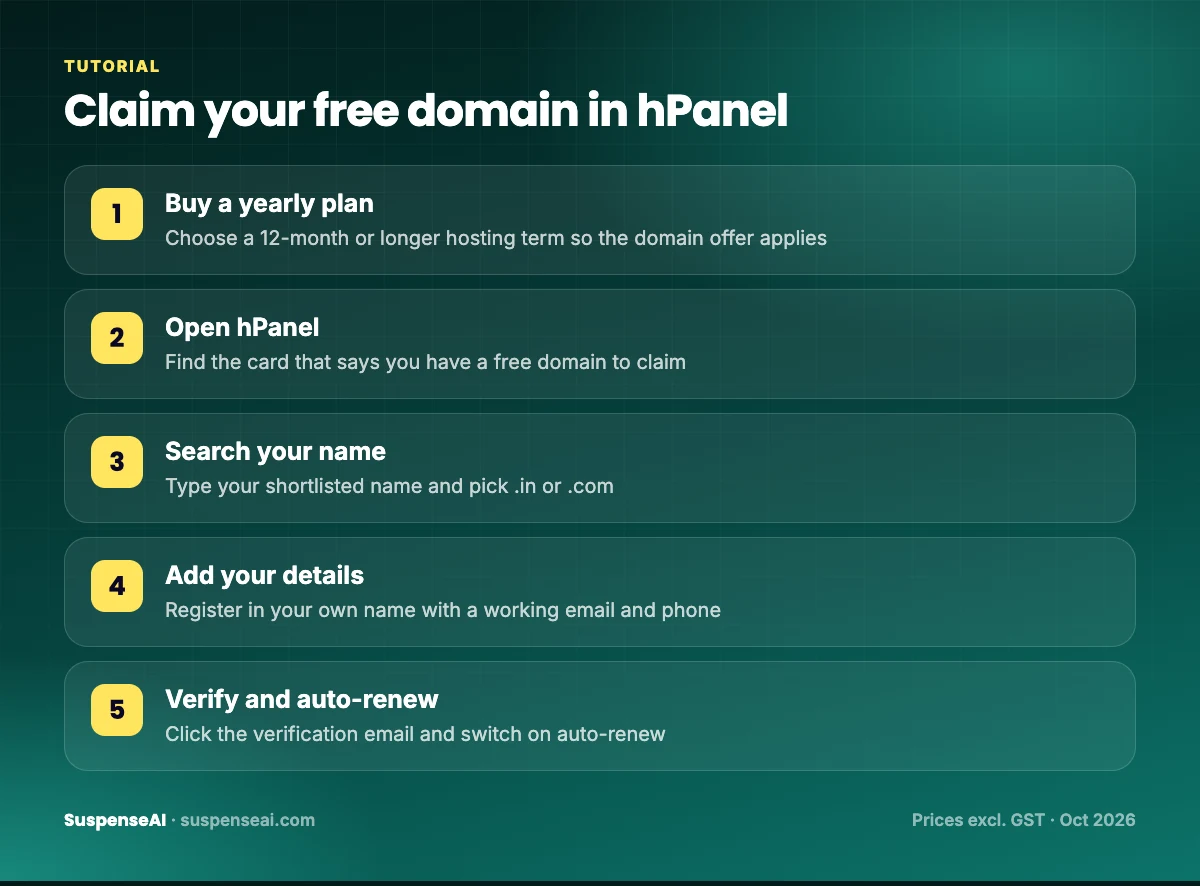
- Pick a hosting plan. Go to Hostinger’s sale page and choose Premium or another plan with a free domain. Select a 12-month or longer term so the domain offer applies.
- Check out. Create your account, confirm the term and price in the cart, and pay with UPI, card or another listed method. Enter your GST number if you want a GST invoice for your business.
- Open hPanel. After payment you land in the hPanel dashboard. Look for a prompt or a card that says you have a free domain to claim.
- Search for your name. Type the name you shortlisted and choose the extension. Eligible extensions for the free offer are shown in the search results.
- Fill in registration details. Use your real name (or business name), working email and phone number. These details matter for verification and for transfers later.
- Verify your email. Registrars usually send a verification email for new domains. Click the link promptly, because unverified domains can be suspended.
- Turn on auto-renew and note the expiry date, which is one year from today.
Connecting your domain to your website
If you claimed the domain on the same Hostinger account as your hosting, connecting it is usually automatic. You set up a website in hPanel, choose your new domain, and Hostinger handles the DNS. The free SSL certificate is applied so your site loads on https://.
From there, you can install WordPress, use the AI Website Builder to generate a starter site from a description, or upload your own files. If you’re starting a blog, our guide to starting a blog in India covers the WordPress setup.
If your domain and hosting are at different companies
You have two options:
- Change nameservers: In your domain registrar’s panel, replace the default nameservers with the ones your host gives you. This hands full DNS control to your host. It’s the easier choice for beginners.
- Point DNS records: Keep nameservers where they are and add an A record pointing to your hosting server’s IP address. Useful if you have other services (like email) already set up at the registrar.
DNS changes can take a few hours to show up everywhere. If your site doesn’t load immediately, wait before you start changing settings again.
Set up a professional email
One of the best reasons to own a domain is email like hello@yourbrand.in. Hostinger’s Single plan includes 1 free mailbox, Premium includes 2 mailboxes per website free for the first year, and Unlimited includes unlimited mailboxes per site free for the first year. Set this up early. Clients and payment gateways take a branded email far more seriously than a free webmail address.
Transferring your domain later
A free domain shouldn’t lock you in. If you ever want to move to another registrar, the process works like this:
- Unlock the domain in your current registrar’s panel.
- Get the transfer authorisation code (often called an EPP or auth code).
- Start the transfer at the new registrar and paste the code. Transfers usually include a paid year of renewal at the new registrar.
- Approve the transfer email and wait for it to complete.
Two common snags: newly registered domains, especially .com, are normally locked against transfer for a period after registration, and a domain close to expiry may be easier to renew first and transfer afterwards. Also remember that moving the domain doesn’t move your website files. Hosting migration is a separate job, though Hostinger offers free website migration if you’re moving a site in.
Who should not chase a free domain in India
A bundle is great value for most beginners, but not for everyone.
- You already have hosting you’re happy with. Buying new hosting just for a free domain makes no sense. Buy the domain on its own; the ₹1 first-year offers on
.inand.comare a cheaper route. - You only need a link-in-bio page. If you’ll never use email, a blog or a store, a free subdomain on a link or portfolio platform may be enough for now.
- You can’t afford the renewal. If roughly ₹1,061 a year for
.in(with GST) is a stretch right now, wait, because losing a domain you’ve promoted hurts more than starting a bit later. - You don’t want to pay upfront. The lowest hosting prices need a 48-month term paid in one go. If that doesn’t fit your budget, choose a shorter term and accept a higher monthly rate.
For everyone else, a plan from Hostinger with a bundled domain is one of the simplest ways to get online with your own address. If you’re still comparing hosts, our Hostinger vs GoDaddy vs Bluehost India breakdown shows which bundles include a domain and what they renew at.
The .in and .co.in extensions are run by NIXI, and the official .IN Registry site explains the rules for Indian domains.
FAQs
Can I really get a free domain in India?
Yes, for the first year. The legit way is a hosting plan that bundles one. Hostinger says “Free domain for 1 year included with yearly plans.” From year two, you pay the regular renewal price.
How much does a .in domain cost after the free year?
Hostinger lists the regular .in price at ₹899 per year, excluding GST. With 18% GST, that’s roughly ₹1,061 per year.
Is .in or .com better for an Indian website?
If most of your customers are in India, .in is a strong, trusted choice and cheaper to renew. If you serve clients abroad, .com is better. Register both if your budget allows.
Is the free domain registered in my name?
With a reputable host like Hostinger, yes. You enter your own details at registration and manage the domain from your account. Avoid any service that registers the domain in its own name.
What happens if I don’t renew my domain?
Your website and domain email stop working after expiry. There’s usually a grace period to renew, but if you miss it, the name can be released and someone else can register it.
Can I move my free domain to another company later?
Yes. Unlock it, get the transfer code, and start the transfer at the new registrar. New registrations may be locked for transfer for a while, so plan ahead.
Is a free blogspot or wordpress.com address good enough?
It’s fine for practice. For a business, freelancing or a serious blog, your own domain looks more professional, gives you custom email, and keeps you in control.
Final word
Getting a free domain in India isn’t about finding a secret website. It’s about choosing a hosting plan that already includes one, then planning for the renewal. Pick .in for an Indian audience or .com for a global one, use AI to brainstorm a short and memorable name, register it in your own name, and switch on auto-renew.
Hostinger’s Sale Season prices start at ₹69/month on the 48-month term (excluding GST, paid upfront), and yearly plans include a free domain for the first year. If you’re ready to start, check the current Hostinger deal and claim your name before someone else does.