Disclosure: This post contains affiliate links. If you buy through them, SuspenseAI may earn a commission at no extra cost to you. Prices were checked on 21 October 2026 and exclude 18% GST.
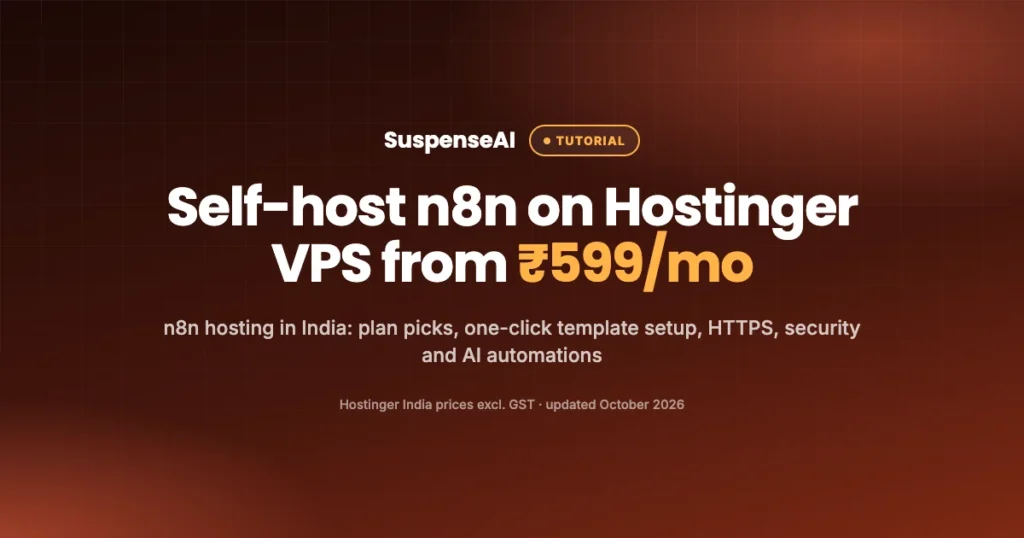
If you want n8n hosting in India without paying per workflow run, the simplest route is a Hostinger VPS with n8n preinstalled. Plans start at ₹599/month (KVM 1, excluding 18% GST), and the “Ubuntu 24.04 with n8n” template sets n8n up in Docker for you, so you can log in and build workflows within minutes of buying.
You get unlimited workflows, unlimited concurrent executions and access to community nodes, because it’s your own server. The trade-off is that you look after it: updates, backups and security are on you, and Hostinger supports the server and keeping n8n running, not your individual workflows.
This guide covers what n8n is, self-hosted vs n8n Cloud, which KVM plan fits your workload, setup step by step, domain and HTTPS, security, three AI automations built for Indian creators and small businesses, queue mode, and full costs including GST and renewal.
What is n8n?
n8n (pronounced “n-eight-n”) is a workflow automation tool. You connect apps and services with visual “nodes” on a canvas, and n8n runs the chain whenever something happens: a form is submitted, an email arrives, a schedule fires, or a webhook is called.
Think of it as Zapier or Make, but with two big differences. First, you can host it yourself. Second, it has strong AI building blocks: nodes for OpenAI and other LLM providers, an AI Agent node that can use tools, and the option to drop into JavaScript or Python with a Code node when the visual blocks aren’t enough.
That makes n8n popular with creators, freelancers and small teams who want to automate content, leads and customer replies with AI, without paying for every single task that runs. Self-hosted n8n hosting on Hostinger India also means you pay in rupees, and Hostinger India supports UPI payments and GST invoices.
Self-hosted n8n vs n8n Cloud
n8n offers its own managed service, n8n Cloud. It’s priced by plan, with limits based on workflow executions. Prices change, so check the n8n website for the current numbers before you compare. The self-hosted version runs on a server you control.
| Factor | Self-hosted on Hostinger VPS | n8n Cloud |
|---|---|---|
| Pricing model | Fixed VPS cost (from ₹599/mo excl. GST) | Plan-based, linked to executions (check n8n’s site) |
| Workflows and executions | Unlimited workflows, unlimited concurrent executions | Depends on plan |
| Community nodes | Yes | Check n8n’s current policy |
| Server maintenance | You (updates, backups, security) | n8n handles it |
| Data location | Your VPS, in the region you choose | n8n’s infrastructure |
| Best for | Heavy use, AI workflows, tinkerers, agencies | Teams who want zero server work |
The short version: for n8n hosting in India, if you run a lot of automations, or your workflows loop over many items (every row in a sheet, every email in an inbox), self-hosting usually works out cheaper and more flexible. If you run a handful of simple workflows and never want to open a terminal, n8n Cloud may suit you better.
Which KVM plan is best for n8n hosting in India?
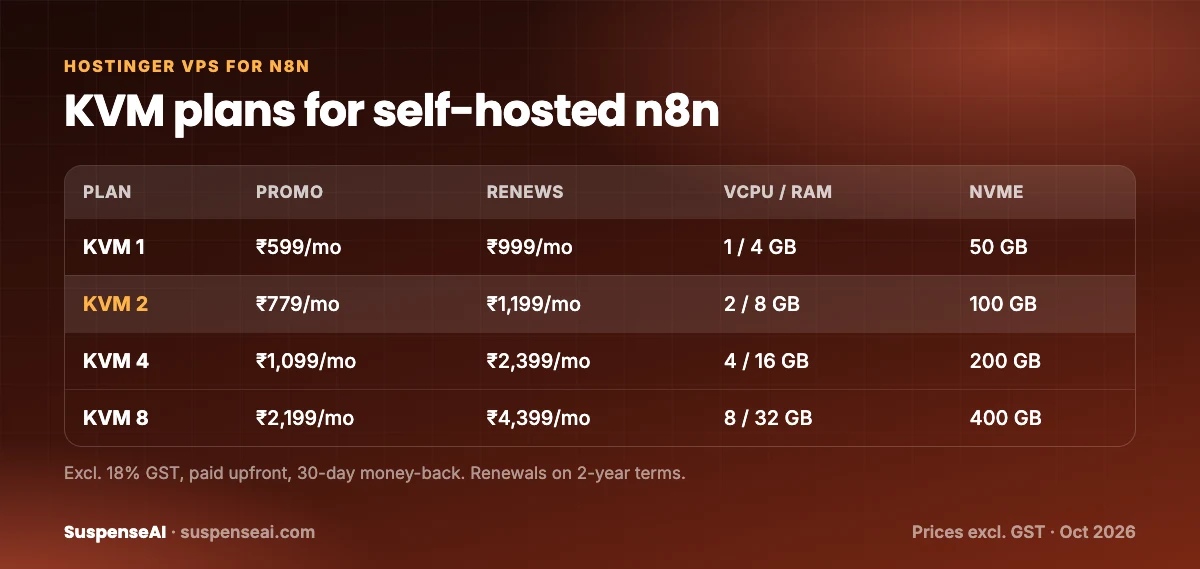
Hostinger’s self-hosted n8n page lists four KVM plans. All prices exclude 18% GST, are paid upfront, and come with a 30-day money-back guarantee.
| Plan | Promo price | Renews at | vCPU | RAM | NVMe storage | Bandwidth |
|---|---|---|---|---|---|---|
| KVM 1 | ₹599/mo | ₹999/mo | 1 | 4 GB | 50 GB | 4 TB |
| KVM 2 | ₹779/mo | ₹1,199/mo | 2 | 8 GB | 100 GB | 8 TB |
| KVM 4 | ₹1,099/mo | ₹2,399/mo | 4 | 16 GB | 200 GB | 16 TB |
| KVM 8 | ₹2,199/mo | ₹4,399/mo | 8 | 32 GB | 400 GB | 32 TB |
Here’s how we’d match plans to workloads. These are starting points, not guarantees, because real usage depends on how heavy your workflows are.
KVM 1 (₹599/mo): learning and light personal automations
One vCPU and 4 GB RAM is enough to learn n8n and run a few scheduled or webhook-triggered workflows: a daily content digest, a lead form that writes to Google Sheets, a Telegram alert bot. Most AI workflows call an external LLM API, so the heavy thinking happens on the provider’s servers, not yours. That keeps KVM 1 usable for AI automations at low volume.
KVM 2 (₹779/mo): the sensible default for creators and freelancers
Double the CPU and RAM for ₹180 more per month. This gives breathing room when several workflows run at once, when you process larger files (PDFs, images, long transcripts), or when you run a database container alongside n8n. If you’re building automations for your business or for one or two clients, start here.
KVM 4 (₹1,099/mo): agencies and queue mode
Four vCPUs and 16 GB RAM suit agencies running workflows for multiple clients, high-volume webhooks, or queue mode with separate worker processes. It also leaves room for other self-hosted tools on the same server.
KVM 8 (₹2,199/mo): heavy production use
Eight vCPUs and 32 GB RAM is for serious production loads: many workers, large data processing, or experimenting with running smaller AI models locally next to n8n. Most readers won’t need this on day one. You can upgrade later.
What about the ₹429/mo n8n offer?
Hostinger also lists an “AI automation (n8n)” offer from ₹429/month on a 24-month plan (was ₹1,999). If you see that on the sale page, compare its resources and what’s included with the KVM plans above before deciding. The KVM table here is what Hostinger’s self-hosted n8n page lists.
Step-by-step: set up n8n on a Hostinger VPS
Hostinger’s onboarding screens change now and then, so treat the wording below as a guide rather than exact button labels.
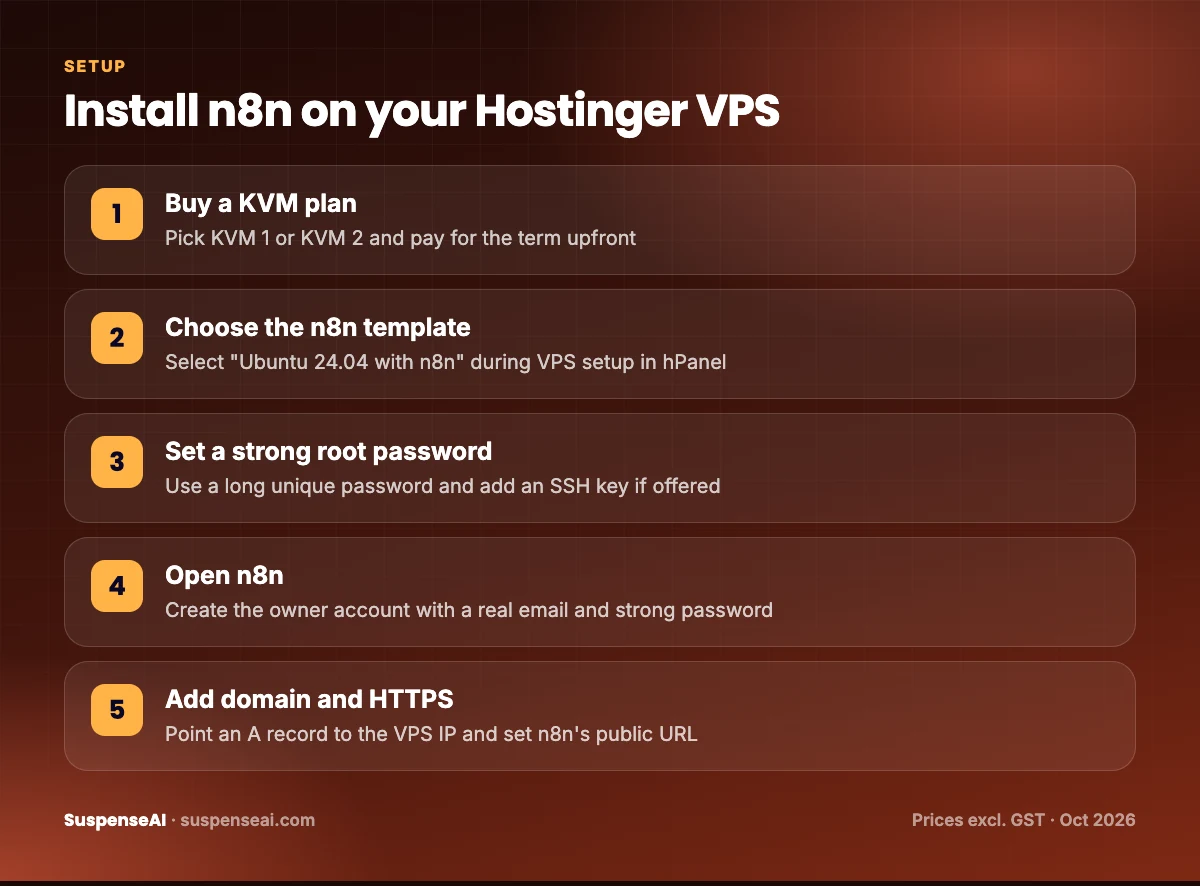
- Choose your plan. Go to Hostinger’s self-hosted n8n page, pick a KVM plan and term, and pay. Note that you pay the whole term upfront. Add your GST number at checkout if you need a GST invoice.
- Start VPS setup in hPanel. After payment, open hPanel and start setting up your new VPS. You’ll be asked to choose a server location. Pick the available location closest to you or your users.
- Select the “Ubuntu 24.04 with n8n” template. In the operating system or application step, choose this template. It installs Ubuntu and runs n8n in Docker. If you plan to use queue mode from day one, look for Hostinger’s separate n8n queue mode template instead.
- Set a strong root password. Use a long, unique password and store it in a password manager. If the setup offers an SSH key option, add your public key too.
- Wait for installation. The VPS dashboard shows progress. When it’s done, you’ll see the server’s IP address and an option to manage or open the n8n application.
- Open n8n and create the owner account. The first account you create becomes the owner. Use a real email and another strong, unique password.
- Build a test workflow. Add a Schedule trigger and a simple action (for example, send yourself a Telegram message). Run it once to confirm everything works.
Add your own domain and HTTPS
You’ll want n8n on a proper address like n8n.yourbrand.in with HTTPS. This matters for two reasons. Webhooks from services like Meta, Telegram or payment gateways expect a stable HTTPS URL, and OAuth logins (Google Sheets, Gmail) need a valid callback URL.
1. Point a subdomain to your VPS
In your domain’s DNS settings, add an A record for a subdomain such as n8n, pointing to your VPS IP address. If you don’t have a domain yet, our guide on how to get a free domain in India explains the legit options, and Hostinger’s domain search lists .in and .com from ₹1 in the first year on eligible terms.
2. Tell n8n its public address
n8n needs to know the URL it’s served on so webhook links and OAuth callbacks are correct. In a Docker setup, this is done through environment variables (n8n’s WEBHOOK_URL is the key one). Hostinger’s n8n template uses a Docker Compose setup, so you edit the environment settings it provides and restart the containers with docker compose up -d.
3. Get the SSL certificate
Self-hosted Docker setups for n8n commonly use a reverse proxy that requests a free Let’s Encrypt certificate automatically once your domain points to the server. Follow Hostinger’s own n8n documentation for the exact file and variable names in its template, since those details can change between template versions.
Wait for DNS to propagate (often minutes, sometimes a few hours), then open https://n8n.yourbrand.in. You should see the padlock in your browser.
Secure your n8n server
A self-hosted n8n instance holds API keys for your email, sheets, social accounts and AI providers. Treat it like a bank locker, not a hobby project.
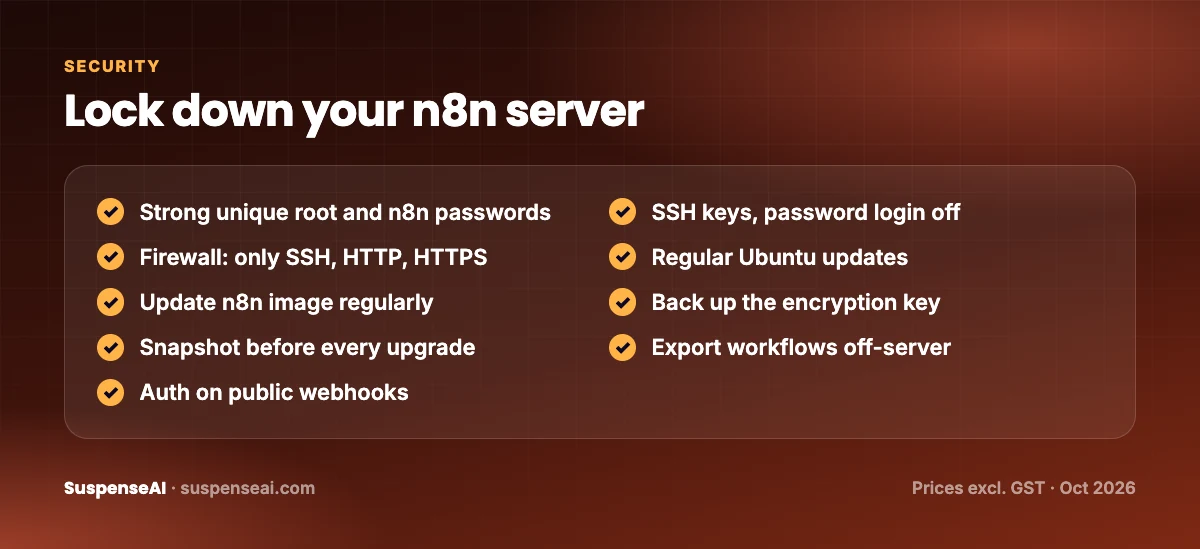
- Strong, unique passwords for the root user and the n8n owner account. Never reuse your email password.
- Use SSH keys and disable password login over SSH once keys work. This blocks most brute-force attempts.
- Turn on a firewall. Allow only the ports you need: SSH, HTTP and HTTPS. Use
ufwon Ubuntu or the firewall settings in your VPS panel if available. - Update Ubuntu regularly with
sudo apt update && sudo apt upgrade. - Update n8n regularly. Pull the newer image with
docker compose pull, then restart withdocker compose up -d. Read n8n’s release notes before major version jumps. - Back up your encryption key. n8n encrypts saved credentials with a key stored in its data folder (or set as
N8N_ENCRYPTION_KEY). Lose it and your saved credentials can’t be decrypted on a new server. - Take snapshots before big changes. Check your VPS dashboard’s backup and snapshot options and take one before every n8n upgrade.
- Export workflows to JSON from time to time and keep a copy off the server, for example in a private Git repo or cloud drive.
- Protect webhooks. Use header authentication or a secret token on public webhook nodes so random visitors can’t trigger your workflows.
- Store API keys in n8n credentials, not pasted inside Code nodes or workflow notes.
3 AI automations for Indian creators and businesses
Here are three practical workflows you can build on a KVM 1 or KVM 2 plan. Each one uses nodes that ship with n8n plus an API key from an LLM provider of your choice.
1. Lead capture to Google Sheets with an AI reply
Who it’s for: coaches, agencies, tuition centres, real estate agents, interior designers.
- A Webhook or form trigger receives an enquiry from your website (name, phone, email, requirement).
- A Google Sheets node appends the lead to your sheet with a timestamp.
- An AI node reads the requirement and drafts a short, polite reply in English or Hinglish, matched to your services. You can also ask it to tag the lead as hot, warm or cold.
- A Gmail or SMTP node sends the reply from your business email, or saves it as a draft if you’d rather review first.
- An optional Telegram node pings you when a lead is tagged “hot.”
The result: every enquiry gets a fast first response, even at 11 pm, and you have a clean lead list without copy-pasting.
2. Content repurposing with an LLM
Who it’s for: YouTubers, podcasters, bloggers and LinkedIn creators.
- An RSS Feed trigger watches your blog or YouTube channel feed for new posts.
- An HTTP Request node fetches the article text or video description (or a transcript, if you store one).
- An AI node turns it into a LinkedIn post, an X thread, an Instagram caption and a short newsletter blurb, each in your tone. Give it a few examples of your past posts in the prompt for better results.
- The drafts land in a Google Sheet, Notion database or your email, ready to review and schedule.
Keep a human in the loop. AI drafts save time, but you should edit before publishing, especially for facts and numbers.
3. WhatsApp or Telegram alert bots
Who it’s for: online sellers, D2C brands, service businesses, anyone who lives on their phone.
- Order alerts: when your store sends a new-order webhook, n8n posts the order summary to a Telegram group for your team.
- Daily digest: a Schedule trigger runs at 9 am, pulls yesterday’s leads, orders or sheet rows, and an AI node writes a three-line summary sent to Telegram.
- Customer FAQs on Telegram: a Telegram trigger receives a question, an AI Agent node answers using your FAQ text, and anything it can’t answer is forwarded to you.
- WhatsApp: n8n has a WhatsApp Business Cloud node, but it requires Meta’s WhatsApp Business Platform setup and approved message templates for outbound messages. It’s doable, just plan extra time for Meta’s verification.
Telegram is the quickest place to start: create a bot through BotFather, paste the token into n8n credentials, and you’re sending messages in minutes.
Queue mode: when one n8n process isn’t enough
By default, n8n runs as a single process that handles the editor, triggers and executions. That’s fine for most people. When you run many workflows at once, or long AI workflows block others, you can switch to queue mode.
In queue mode, the main n8n instance receives triggers and puts jobs in a queue (Redis), and separate worker processes pick them up and run them. You can add more workers as load grows. Execution data is stored in a database such as PostgreSQL rather than the default SQLite.
Hostinger offers a separate VPS template for n8n queue mode, which saves you wiring Redis, Postgres and workers together by hand. If you’re going this route, KVM 4 or above gives you room for multiple workers. If you’re just starting, skip queue mode and come back to it when you actually hit limits.
What Hostinger supports, and what it doesn’t
This is important to understand before you buy. According to Hostinger’s self-hosted n8n page:
- Hostinger supports: the VPS environment and keeping n8n running. If the server or the template-installed n8n isn’t starting, their support can help.
- Hostinger does not support: your workflows, your custom code, or how you connect third-party APIs. If your Google Sheets node fails because of a permissions issue, or your prompt gives poor results, that’s for you (and n8n’s community forum) to solve.
Hostinger also offers Hostinger Agent, its AI assistant for support and site management, which can help with account and support questions. For n8n-specific workflow help, the n8n docs and community forum are the best places.
Real n8n hosting costs: GST, upfront payment and renewal
Hosting prices on Hostinger India exclude 18% GST and are paid upfront. Here’s what that means in practice for KVM 1, using simple maths:
| Item | Per month | Over 24 months |
|---|---|---|
| KVM 1 promo price (excl. GST) | ₹599 | ₹14,376 |
| 18% GST | ₹107.82 | ₹2,587.68 |
| Promo total incl. GST | ₹706.82 | ₹16,963.68 |
| KVM 1 renewal (excl. GST) | ₹999 | ₹23,976 |
| Renewal total incl. GST | ₹1,178.82 | ₹28,291.68 |
The 24-month column is an illustration, assuming the promo rate applies to the term you pick. Confirm the exact term and total in your cart. Renewals on Hostinger’s n8n VPS are on 2-year terms at the regular rates listed above (₹999, ₹1,199, ₹2,399 or ₹4,399 per month depending on plan, excluding GST).
Two other costs to budget for:
- LLM API usage. Your AI nodes call providers like OpenAI or others, which bill separately based on usage. For light workflows this is usually small, but long documents and frequent runs add up. Set spending limits in your provider dashboard.
- A domain. Optional but recommended for HTTPS and webhooks. Hostinger lists regular
.inrenewal at ₹899/year and.comat ₹1,499/year, excluding GST.
If you also need a regular website or blog, a shared hosting plan is cheaper than a VPS for that job. See our Hostinger Sale 2026 India guide for those plans, or our Hostinger review India for the bigger picture.
Who should not self-host n8n
- You never want to touch a server. Updates, backups and security are your job. If that sounds stressful, n8n Cloud or another managed tool is a better fit.
- You run two or three tiny workflows. A VPS may be more than you need. Compare with n8n Cloud’s entry plan first.
- You need someone to fix your workflows. Hostinger supports the server and n8n staying up, not your automations.
- You can’t pay upfront. VPS plans are billed for the whole term at once.
For everyone else, especially creators and small businesses who want AI automations without per-run billing, self-hosting on a Hostinger VPS is good value, with a 30-day money-back guarantee if it doesn’t work out.
For node references and deployment details, keep the official n8n documentation open while you build.
FAQs
What is the cheapest n8n hosting in India on Hostinger?
The KVM 1 VPS at ₹599/month (excluding 18% GST, paid upfront) with the “Ubuntu 24.04 with n8n” template. Hostinger also lists an AI automation (n8n) offer from ₹429/month on a 24-month plan, so compare both on the sale page.
Is self-hosted n8n free?
The self-hosted n8n software is free to use under n8n’s own licence, but you pay for the server it runs on, plus any AI APIs your workflows call.
Is KVM 1 enough for n8n?
For learning and light workflows, yes. With 1 vCPU and 4 GB RAM, it handles a few scheduled or webhook workflows. If you run many workflows at once or process large files, choose KVM 2.
Does Hostinger help if my workflow breaks?
No. Hostinger supports the VPS and keeping n8n running, not your workflows or custom code. Use the n8n docs and community forum for workflow issues.
Can I use my own domain with HTTPS?
Yes. Point a subdomain’s A record to your VPS IP, set n8n’s public URL in its environment settings, and use the template’s SSL setup to get a free certificate.
Do I need queue mode?
Not at the start. Queue mode helps when many workflows run at once. Hostinger has a separate n8n queue mode template for when you need it.
Can I connect WhatsApp to n8n?
Yes, through the WhatsApp Business Cloud node, but you need a Meta WhatsApp Business Platform setup. Telegram is quicker to start with.
Final word
Self-hosting n8n on a Hostinger VPS gives you unlimited workflows and executions, community nodes and full control, from ₹599/month on KVM 1 (₹706.82 with GST). It’s the most cost-effective route to n8n hosting in India if you’re comfortable with basic server care. Start on KVM 1 or KVM 2, add your domain and HTTPS, lock the server down, and build one AI automation that saves you real time this week.
Remember the fine print: you pay upfront, the promo price is for the first term, and renewal is at ₹999/month and up (excluding GST). If that works for you, grab your n8n VPS on Hostinger while Sale Season pricing is live.